Italian Revenue Service portal
To go live with Invoicetronic you must configure two things on the Italian Revenue Service portal—commonly called Cassetto fiscale in Italian, which includes the Fatture e Corrispettivi section dedicated to electronic invoicing:
- Register the Codice Destinatario
7HD37X0to receive incoming invoices on Invoicetronic - Enable regulation-compliant invoice storage (free service offered by the Agenzia)
None of this is needed in Sandbox
The steps on this page apply only to the live environment. The Sandbox replicates the real workflow 100% but is fully isolated from the Sistema di Interscambio (SDI): all you need is a test API Key (ik_test_...) to develop and test your integration end-to-end—no registration on the Italian Revenue Service portal, no storage to enable, no real interaction with SDI. Configure the Cassetto fiscale only when you're ready to go to production.
The steps below must be performed by the company owner (or by their accountant under delegated authority): they require access to your private area on the Agenzia portal and Invoicetronic cannot perform them on your behalf.
Register with the Italian Revenue Service
To receive invoices on the Invoicetronic API, you must first register your Codice Destinatario 7HD37X0 in your Fatture e Corrispettivi area on the Agenzia delle Entrate website.
Log in to the restricted area with your credentials, your CNS, or your SPID. After a couple of steps where you select your account and agree to the Terms of Service, you land on this page:

Select Registrazione dell'indirizzo telematico dove ricevere tutte le fatture elettroniche, and you will come directly to the page where you can enter your Codice Destinatario.
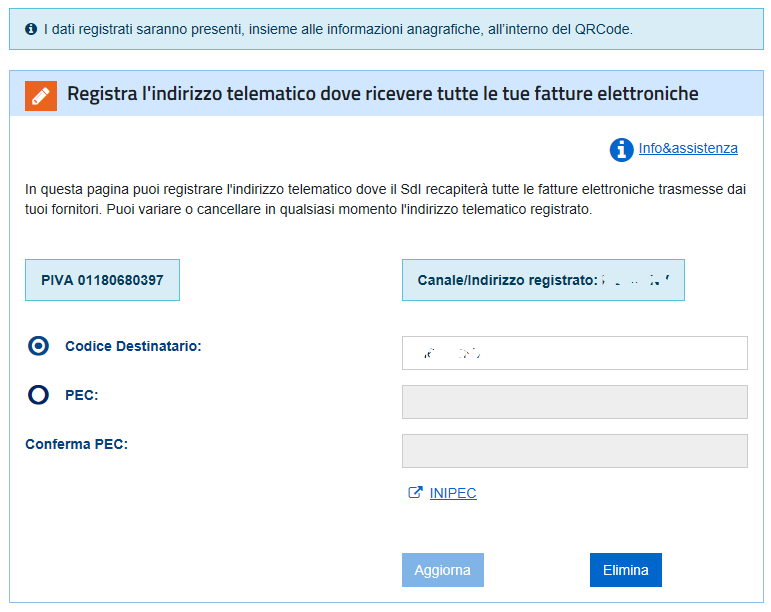
Enter 7HD37X0 as the Codice Destinatario, and confirm. From now on, your incoming invoices will be delivered to the Invoicetronic API.
Switching from another provider?
Check out the Switching providers guide for the most common questions about the transition: no cutoff date needed with your vendors, and you can test everything in Sandbox before making the switch.
Create your companies before registering the Codice Destinatario
Inbound invoices are routed to your account by the recipient VAT number (CessionarioCommittente): the company must exist in Invoicetronic for the invoice to be matched. If an invoice arrives before its company has been registered, it is held by our SDI infrastructure and automatically re-processed as soon as you create the company—no invoice is lost.
There are two ways to register a company:
POST /company/explicitly via the API. This is the only option if you only receive invoices and never send any (for example a private individual): until the company is created explicitly, no invoice will be delivered to you.- Send at least one outbound invoice: the supplier company is created implicitly on the first
POST /send/.
If you manage multiple companies, register all of them first. The recommended order is: create your companies in Invoicetronic first, then register the Codice Destinatario in Fatture e Corrispettivi.
No cutoff date needed
Once you register Invoicetronic's Codice Destinatario in Fatture e Corrispettivi, all your incoming invoices will be delivered to the Invoicetronic infrastructure—even those sent by vendors still using your previous recipient code. The Italian Revenue Service (SDI) automatically forwards invoices to your registered address, regardless of the code your vendors specify. This means there's no need for a hard cutoff date: your vendors can update their records gradually, or not at all. For more details, see the Switching providers guide.
Share your new Codice Destinatario
While SDI handles forwarding automatically, it's still a good practice to share your new Codice Destinatario with your vendors—especially new ones. This ensures invoices are addressed correctly from the start and avoids any potential delays from the forwarding process.
Operators managing multiple companies
Registration on the Agenzia delle Entrate website, as well as enabling regulation-compliant invoice storage, must be done by each client, in their own name. Italian companies usually already have access to the portal, or can easily obtain it—either directly or through their accountant. If you manage multiple clients, you can use your own Invoicetronic account and API keys for all of them, but each client must complete the registration on the Agenzia delle Entrate website following the instructions above. For more details, see the Switching providers guide.
Enable regulation-compliant storage of your invoices
From the first page of the Cassetto fiscale, click on Fatturazione Elettronica, and you will land on this page:

Choose the Accedi alla sezione conservazione option, and you will only have to agree to two blocks of contract terms to complete your membership in the service:

At this point, click Invia to complete the activation of the preservation service. From now on, all invoices sent to the Agenzia Entrate SDI system (through the Invoicetronic API) will be retained for 15 years on the Agenzia website.
Of course, all these steps can also be done by your advisor (accountant) with delegated authority for your normal tax activities, which most accountants already have.
Already have a storage service?
Regulation-compliant storage is a legal requirement, but it can be fulfilled by any accredited storage provider: you are not required to use the Italian Revenue Service. If you already have a storage service active with another vendor (for example through your accountant), this step is not necessary: the free service offered by the Agenzia delle Entrate is just one option among many.
That said, in practice the Italian Revenue Service is also the most convenient option: once enabled, every invoice that transits through SDI is stored automatically, with no action required on your part. With an external storage provider, you typically have to upload the XML invoices yourself (manually or via your own ingestion pipeline). If you don't already have a solution in place, enabling the Agenzia's service is the quickest—and free—way to be compliant.